Dynamic colour palettes with CSS color-mix()
The new CSS color-mix() function gives us something I’ve wanted for a long time - the ability to generate tints, shades and even an entire colour palette from a single given colour in plain CSS. With all the cool new CSS features dropping lately, this one flew under the radar a bit, but it’s actually capable of a lot more than I first thought.
What about relative colour syntax?
The new CSS relative-color-syntax is going to give us even more flexibility for generating dynamic colours, but (as of writing) browser support is still lacking (only Safari 16.4+). There are a few polyfills, the best of which is probably postcss-relative-color-syntax, but (being a preprocessor) PostCSS plugins can’t fully support CSS custom properties within declarations, which severely limits what you can achieve.
color-mix() to the rescue
Color-mix() can do exactly what the name suggests, but with cylindrical colour spaces (LCH, OKLCH, HSL & HWB) we can do some pretty cool things, like generating complimentary and analogous colour palettes from a single colour, and it now has support in all major browsers 🎉
The CodePen below demonstrates some of what can be done - just change the —brandColour custom property to generate all sorts of relative colours!
See the Pen by bengamino(@bengamino) on CodePen.
How it works
A quick note on colour spaces…
The colour space you choose can drastically change the result of color-mix(). For these examples I’m going to stick to OKLAB and OKLCH, as they seem to produce the best results (and they’re also now supported in all major browsers too!)
The syntax
For basic usage, we define the colour space that we want to output to, then the colours we want to mix.
p{
color: color-mix(in oklab, red, blue); // Makes purple
}
This will make a new OKLAB colour by mixing 50% red and 50% blue.
We can also control the percentages by which the colours should be mixed
p{
color: color-mix(in oklab, red, blue 25%); // Makes purpley-pink
}
This will mix 75% red and 25% blue. By specifying one percentage value, the other will be inferred to make up 100%.
Generating tints and shades
To make tints and shades of a given colour, we can mix white or black of varying percentages. The results are a lot more predictable than Sass lighten() and darken().
:root{
--brandColour: cornflowerblue;
--tint: color-mix(in oklab, var(--brandColour), #fff 75%);
--shade: color-mix(in oklab, var(--brandColour), #000 40%);
}

button{
color: var(--shade);
background-color: var(--tint);
}
Hue interpolation
There is one more option we can define: the hue interpolation method. The possible values are shorter, longer, increasing and decreasing. This option is only valid for cylindrical colour spaces, and is a syntax error in the others.
p{
color: color-mix(in oklch shorter hue, red, blue 50%);
}
This gives us a nice bright purple as you would expect.
p{
color: color-mix(in oklch longer hue, red, blue 50%);
}
But this is where it gets fun. You might reasonably expect this to give you purple as well, but the output is green! Let’s figure out why…
How hue interpolation works
All cylindrical colour spaces use a hue value specified in degrees (between 0 and 360). The hue interpolation method determines the path taken through the colour space when generating the new colour.
The default value is shorter, which takes the shortest path between the two colours within the colour space.
If we use longer, color-mix() takes the longest path between the two colours.
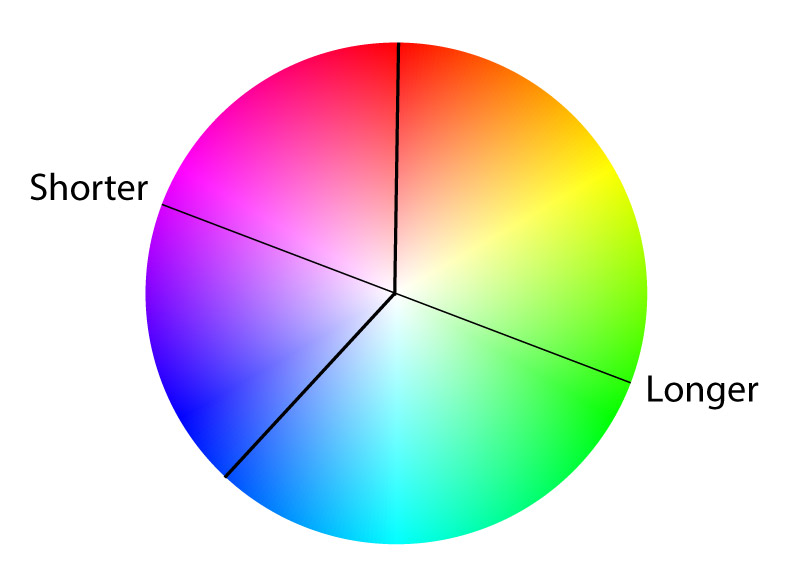
This is how we ended up with green in the previous example, and this gives us a lot of flexibility to effectively create relative colours, without the relative colour syntax.
Increasing will return and angle between 0 and 360deg, while decreasing will return and angle between 0 and -360deg.
In the end, the hue angle wraps around and is normalised to be between 0 and 360deg, so -120deg is equivalent to 240deg.
Complimentary colours
The trick here is that by mixing a colour with itself, and specifying the longer hue interpolation method, color-mix() will go all the way around the colour space and stop on the opposite side of the colour wheel (or at whatever percentage we specify).
p{
color: color-mix(in oklch longer hue, hotpink, hotpink);
}
Analogous colours
We can specify percentage values to generate any relative colour we want.
:root{
--brand: hotpink;
}
li:nth-child(1){
background: color-mix(in oklch longer hue, var(--brand) 10%, var(--brand));
}
li:nth-child(2){
background: color-mix(in oklch longer hue, var(--brand) 20%, var(--brand));
}
li:nth-child(3){
background: color-mix(in oklch longer hue, var(--brand) 60%, var(--brand));
}
li:nth-child(3){
background: color-mix(in oklch longer hue, var(--brand) 70%, var(--brand));
}
Using this method, we can generate any relative colour palette we want - analogous, split-complementary, triad etc., including tints and shades of each!
Limitations
The main drawback of this method is that we can’t individually adjust values such as lightness, chroma and hue like relative-color-syntax will allow. As such, it works best with vibrant colours around 50% lightness. You also need to be careful with contrast when using user defined colours.
Firefox behaviour
You’ll notice in the codepen demo above that I’m generating an extra colour like this
:root{
--brand: hotpink;
--brandClone: color-mix(in oklch, var(--brand), white 0.1%);
}
This is because, in Firefox 114, mixing a colour with itself always seems to result in the original colour being returned, regardless of the hue interpolation method. But by making a new colour that’s a tiny bit lighter than the original, then mixing them…
p{
color: color-mix(in oklch longer hue, var(--brand), var(--brandClone));
}
we get the desired outcome.
I also found that the following does not work in Firefox
:root{
--brand: hotpink;
/*
Using OKLAB instead of OKLCH
*/
--brandClone: color-mix(in oklab, var(--brand), white 0.1%);
}
/*
Trying to nest color-mix() function using a non-cylindrical colour space
*/
p{
color: color-mix(in oklch longer hue, var(--brand), var(--brandClone));
}
So if you’re nesting color-mix() functions like this, you’ll need to use a consistent colour space.